

One Photo, Endless Styles
Move from soft romantic portraits to bold Y2K collages, dreamy seasonal edits, or vintage-inspired looks with a single reference photo and a few preset switches.
Bring your photos to life with a curated collection of AI photo effects, from nostalgic looks to trend-led aesthetics. Upload an image, switch styles in seconds, and turn a simple photo into something striking without leaving the workspace.
Try a sample
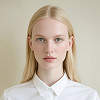
AI Ghibli Effect

Transform everyday photos into polished, eye-catching visuals with an effect library designed for quick exploration. Each preset helps shape color, texture, and mood automatically, so you can reach a professional-looking finish in a few clicks instead of rebuilding the look from scratch.
Move from soft romantic portraits to bold Y2K collages, dreamy seasonal edits, or vintage-inspired looks with a single reference photo and a few preset switches.

Keep the subject recognizable while the effect refines color, texture, and atmosphere, giving the result a more natural, believable finish.

Explore a library shaped by social trends, viral aesthetics, and seasonal moods so new looks are always close at hand when you need fresh content.

Create polished visuals that feel ready for social posts, campaign creatives, moodboards, and fast personal sharing without extra editing steps.
Start with a clear, high-quality image. Better subject detail and cleaner framing usually produce a more stable and appealing final effect.


Browse the available presets and choose the effect that best matches the mood, aesthetic, or visual direction you want for the image.

Generate the result, compare nearby styles if needed, and keep the version that feels right before saving or reusing it in your next creative flow.
You can explore painterly looks, seasonal aesthetics, collage styles, retro treatments, portrait-oriented presets, and other visual directions from the image effects library.
No. The workflow is preset-led: upload a photo, choose a style, and generate. You can keep iterating visually without building a complex manual edit.
Use photos with a clear subject, readable details, and balanced lighting. Cleaner source images make it easier for the selected effect to hold shape and atmosphere.
Yes. The image effects workflow is well suited to social posts, creative moodboards, quick campaign mockups, and other share-ready visual content.
Uploads stay within the creation workflow for generation and comparison. Use account and storage policies that fit your team’s privacy requirements before sharing results.
Pick a style, test a few variations, and move straight into generation from the same workspace.